
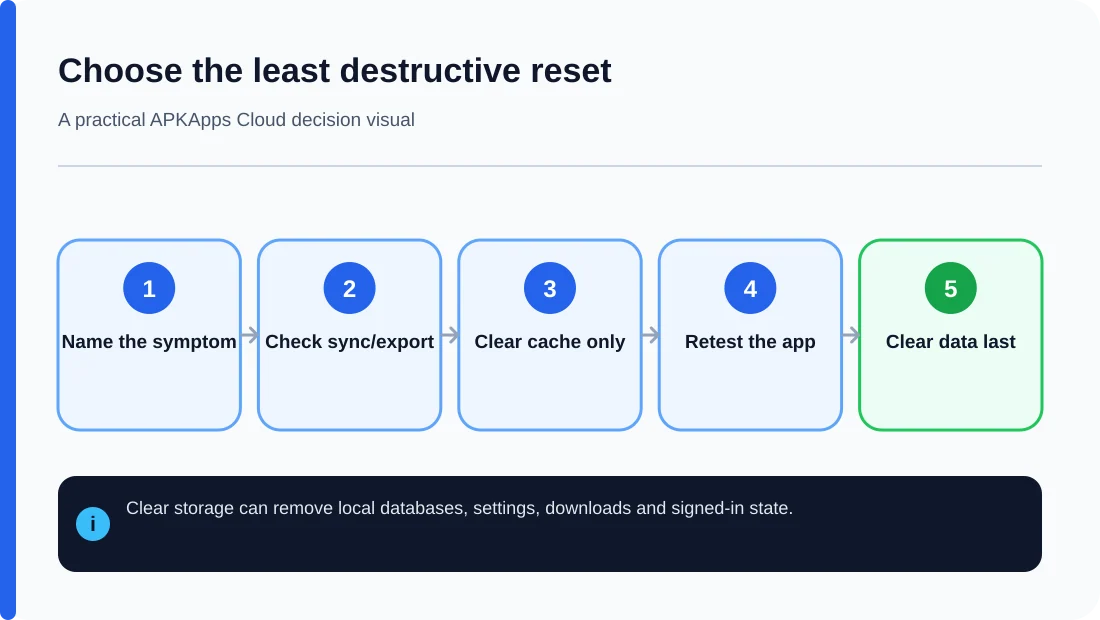
Clearing an app’s cache and clearing its app data are not the same operation. Cache is temporary material the app can usually rebuild. Clearing storage or app data resets the app much closer to a fresh installation and can remove local databases, settings, downloaded content and authentication state.
Google’s Android storage guidance describes “Clear cache” as deleting temporary data, while “Clear storage” permanently deletes app data. That difference is why clearing data should not be a routine first response to every crash or installation problem.
What clearing cache usually removes
Cache commonly contains temporary images, thumbnails, downloaded responses, compiled or generated files and other material used to make the app faster. Removing it can free space or force the app to rebuild stale temporary files.
The first launch afterward may be slower because the app has to recreate or download some of that material. A cache clear should not normally erase your account’s server-side information, but the exact experience still depends on how the app is designed.
What clearing app data or storage removes
Clearing storage can erase the app’s private local state: preferences, databases, locally stored files, tokens, session information and other records. The app may open as if it was just installed.
Anything stored in an account’s cloud service can return after you sign in again, but local-only information may be gone permanently. Do not assume a login screen means your previous notes, game progress, drafts, downloads or custom settings are safely stored online.
Cache is not a backup
Some users hesitate to clear cache because they think it contains the only copy of their information. Normally, important persistent data should not live only in cache. But an app can still behave poorly if its cache is removed at an inconvenient time, and offline media may need to be downloaded again.
Before clearing anything in an app used for work, photos, authentication, messaging or personal records, check whether the app offers an export or documented backup route.
When clearing cache is a reasonable test
Cache clearing is most useful when a problem looks temporary: corrupted thumbnails, stale downloaded content, unusually large temporary storage or a UI that refuses to refresh after the underlying account data has changed.
It is less likely to solve package-signing errors, version-code problems, missing split APKs or hardware compatibility. Those failures occur before the app’s ordinary cache can fix anything.
When clearing data may be justified
Clearing data can help when an app’s local configuration is badly corrupted, when a developer specifically documents it as a recovery step, or when you deliberately want to reset the app. It should come after you have checked whether important information is synced or exported.
If you cannot tell whether the app keeps data locally or online, treat “Clear storage” as potentially destructive. Take screenshots of settings, export what the app allows and confirm account credentials before proceeding.
Cache, local data, cloud data and account data
| Type | Where it usually lives | Likely effect of Clear cache | Likely effect of Clear storage |
|---|---|---|---|
| Cache | Temporary app directories | Removed | Removed |
| Local app data | Private app storage/database | Usually retained | Usually removed |
| Cloud-synced data | Developer or account servers | Retained online | Usually retained online, but must resync |
| Account session | Local tokens plus server account | Usually retained | Often signed out |
These are typical outcomes, not promises for every app. Developers decide what gets stored where.
Do not clear data to fix installation identity problems
If Android rejects an APK because its signing certificate does not match the installed app, clearing cache or storage does not change the package signature. Likewise, a lower version code or missing split APK is not repaired by deleting user data. Diagnose the installer error first.
Sources and further reading
Google Play Help: Free up storage on Android
Android Developers: Data and file storage overview
Related APKApps Cloud guides
Before a more destructive reset, read what Android backup may not save and why copying an APK is not a data backup.